Team: Point Cloud Nine · RAS 598 · ASU · Spring 2026
Milestone 2 delivers autonomous navigation in a pre-mapped warehouse environment using Nav2 and SLAM Toolbox, a verified noise injection subsystem, a working 3-DOF robotic arm with parallel gripper mounted on bcr_bot, and the foundational arm sequencing and fetch coordination nodes required for the full pick-and-place pipeline in Milestone 3.
On This Page
- 1. Milestone 1 Feedback Integration
- 2. System Architecture Update
- 3. Kinematics
- 4. SLAM Mapping
- 5. Autonomous Navigation with Nav2
- 6. Noise Injector: Analysis & Results
- 7. Arm Integration
- 8. New Nodes
- 9. System Node Graph
- 10. Run-Time Issues & Solutions
- 11. Milestone Video
- 12. Individual Contributions
1. Milestone 1 Feedback Integration
| Professor Feedback | Action Taken |
|---|---|
| Robot platform selection needed justification | Added explicit rationale for bcr_bot over TurtleBot4 in M1 Section 5 (no official TB4 + arm URDF exists) |
| Arm choice was underspecified | Replaced OpenMANIPULATOR-X plan with custom 3-DOF arm; documented joint geometry, mount position, and reach calculations |
| Simulation world should be confirmed working | Switched from depot.sdf (TurtleBot4-specific) to small_warehouse.sdf which ships with bcr_bot and was verified working in Gazebo Harmonic |
| Dependencies needed to be more concrete | Updated M1 Section 6 with actual installed package versions and build decisions |
| Architecture diagram should reflect actual implementation | Updated Mermaid diagram to match actual ROS 2 nodes running in simulation |
2. System Architecture Update
What Changed from M1
The core pipeline remains Perception → Estimation → Planning → Actuation, but several implementation choices changed during M2 development:
| Component | M1 Plan | M2 Implementation | Reason |
|---|---|---|---|
| Robot | TurtleBot4 | bcr_bot | No official TB4 + arm URDF |
| Arm | OpenMANIPULATOR-X | Custom 3-DOF xacro | gz_ros2_control ABI mismatch on aarch64 |
| Arm control | ros2_control JTC | Gazebo JointPositionController | Bypasses broken apt package |
| Simulation world | depot.sdf | small_warehouse.sdf | Ships with bcr_bot |
| Localization | AMCL only | AMCL + static TF publisher | AMCL timing issue on startup |
| Map frame | Published by AMCL | Static transform at map origin | Workaround for transform timeout |
Current Module Status
| Module | Package | Type | Status |
|---|---|---|---|
| SLAM Toolbox | slam_toolbox | Library | ✅ Used for mapping; map saved |
| Nav2 Stack | nav2_bringup | Library | ✅ Active — goals accepted and reached |
| AMCL Localization | nav2_amcl | Library | ✅ Active with initialpose workaround |
| Noise Injector | semantic_fetch_robot | Custom | ✅ Verified — noisy topics publishing |
| Navigate to Goal | semantic_fetch_robot | Custom | ✅ Nav2 action client working |
| Arm Controller | semantic_fetch_robot | Custom | ✅ All 5 joints responding |
| Fetch Coordinator | semantic_fetch_robot | Custom | ✅ Full sequence implemented |
| Combined URDF | bcr_bot_with_arm | Custom | ✅ Robot + arm spawning correctly |
| Semantic Map Server | — | Custom | 🔜 M3 |
| Vision Node (YOLOWorld) | — | Custom + Library | 🔜 M3 |
3. Kinematics
3.1 Differential Drive Base Kinematics
The bcr_bot uses a standard differential drive kinematic model with two powered traction wheels (middle left and middle right) and four passive trolley wheels for stability.
System parameters:
| Parameter | Symbol | Value |
|---|---|---|
| Wheel separation | \(L\) | 0.625 m (track width + wheel width − 0.01) |
| Wheel radius | \(r\) | 0.101 m |
Forward kinematics — given right wheel velocity \(v_r\) and left wheel velocity \(v_l\):
\[v = \frac{v_r + v_l}{2}\] \[\omega = \frac{v_r - v_l}{L}\]State update over timestep \(\Delta t\):
\[x' = x + v \cos(\theta) \cdot \Delta t\] \[y' = y + v \sin(\theta) \cdot \Delta t\] \[\theta' = \theta + \omega \cdot \Delta t\]Mapping /cmd_vel to wheel velocities — Nav2 publishes linear.x and angular.z on /cmd_vel. The Gazebo diff-drive plugin converts these to individual wheel velocities:
The bcr_bot’s maximum commanded speed is 1.0 m/s linear and 4.18 rad/s angular (as tested during Nav2 teleoperation). Nav2’s MPPI controller operates well within these limits, typically commanding 0.3–0.5 m/s linear during autonomous navigation.
3.2 3-DOF Arm Kinematics
The custom arm uses a serial chain of three revolute joints all rotating about the Y axis (pitch). This design choice, all joints sharing the same axis, simplifies inverse kinematics to a planar 2D reach problem.
Joint parameters:
| Joint | Axis | Link Length After Joint | Range |
|---|---|---|---|
arm_joint1 | Y | 0.200 m (l1_len) | ±90° |
arm_joint2 | Y | 0.410 m (l3_len) | ±90° |
arm_joint3 | Y | 0.200 m (forearm + TCP) | ±90° |
Forward kinematics — end-effector position in the arm base frame given joint angles \(\theta_1, \theta_2, \theta_3\):
\[x_{tcp} = l_1 \sin(\theta_1) + l_2 \sin(\theta_1 + \theta_2) + l_3 \sin(\theta_1 + \theta_2 + \theta_3)\] \[z_{tcp} = l_1 \cos(\theta_1) + l_2 \cos(\theta_1 + \theta_2) + l_3 \cos(\theta_1 + \theta_2 + \theta_3)\]Maximum reach (all joints fully extended): \(0.200 + 0.410 + 0.200 = 0.810 \text{ m}\). With the arm mounted at \((x=0.10, z=0.18 \text{ m})\) above base_link, and base_link at 0.295 m above the floor, the arm base is approximately 0.475 m above the ground — giving a working floor-to-arm-base distance well within reach.
Hardcoded grasp poses (measured from Gazebo joint states):
| Pose | joint1 | joint2 | joint3 | Gripper |
|---|---|---|---|---|
| Home | 0.000 | 0.000 | 0.000 | Closed |
| Pregrasp | 1.043 | 0.934 | 0.495 | Open (35 mm) |
| Grasp | 1.156 | 1.163 | 0.913 | Open → Close |
| Carry | 0.827 | 0.527 | 0.299 | Closed |
3.3 Gripper Kinematics
The parallel gripper uses two prismatic joints (left_finger_joint, right_finger_joint) each with 35 mm stroke. Both fingers move symmetrically along the X axis. Closing the gripper commands both joints to 0.0 m; opening commands both to 0.035 m. Finger friction coefficient \(\mu = 1.5\) in Gazebo to simulate grip on small objects.
4. SLAM Mapping
Mapping Process
The warehouse map was built by teleoperating bcr_bot through the small_warehouse.sdf environment using SLAM Toolbox in online async mapping mode. Key configuration changes from default:
| Parameter | Default | Our Value | Reason |
|---|---|---|---|
scan_topic | /scan | /bcr_bot/scan | bcr_bot publishes on namespaced topic |
base_frame | base_link | base_footprint | bcr_bot TF tree uses base_footprint |
transform_timeout | 0.2 s | 2.0 s | VM timing — extra buffer for TF lookups |
mode | mapping | mapping | Disabled localization mode for initial map build |
A scan relay node (topic_tools relay /bcr_bot/scan /scan) was required because Nav2’s costmaps subscribe to /scan by default. This was resolved in the custom Nav2 params file by setting scan_topic: /bcr_bot/scan directly.
Map Saved
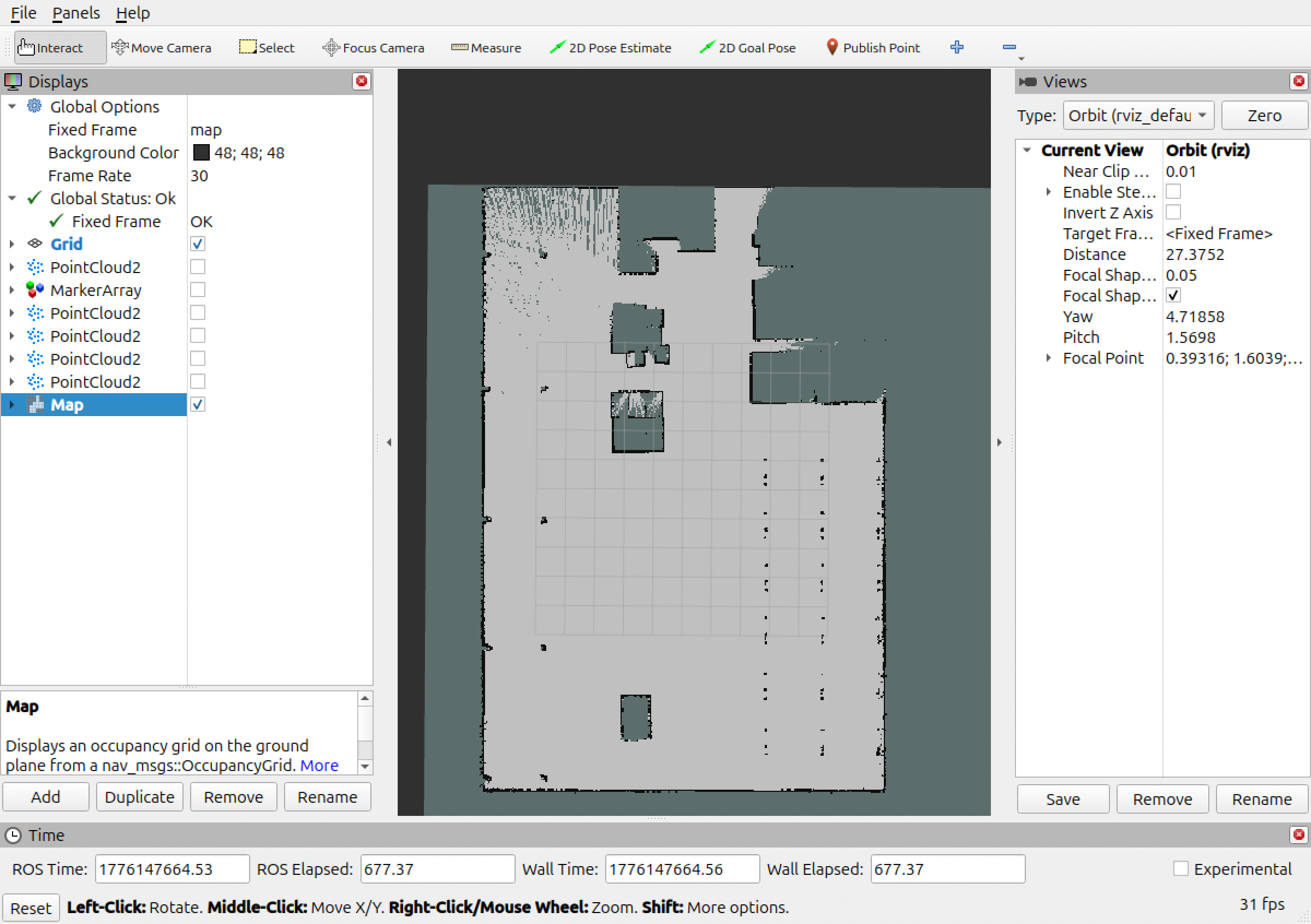
The saved map covers the full warehouse environment:
| Property | Value |
|---|---|
| Resolution | 0.05 m/cell |
| Size | 523 × 517 cells (26.15 m × 25.85 m) |
| Origin | [−16.344, −14.035, 0] |
| Free threshold | 0.196 |
| Occupied threshold | 0.650 |
| Files | maps/warehouse_map.pgm, maps/warehouse_map.yaml |
Map was saved using:
ros2 run nav2_map_server map_saver_cli \
  -f ~/Documents/bcr_ws/maps/warehouse_map
5. Autonomous Navigation with Nav2
Launch Configuration
Navigation is launched with the full bringup_launch.py stack, which includes the map server, AMCL, planner server, controller server, behavior server, and bt_navigator. Key customizations in nav2_params.yaml:
| Parameter | Change | Effect |
|---|---|---|
robot_base_frame | base_link → base_footprint | Matches bcr_bot TF tree |
scan_topic | scan → /bcr_bot/scan | Routes LiDAR from namespaced topic |
Map→Odom Transform Workaround
AMCL requires an initial pose estimate before it publishes the map→odom transform. Without this transform, Nav2’s costmaps cannot activate. During development, AMCL’s scan timestamps were offset from the TF cache causing repeated transform timeout failures.
Workaround: A static_transform_publisher node publishes the map→odom transform at the map origin (−16.344, −14.035, 0) until AMCL establishes localization. The initial pose is then set via:
ros2 topic pub --once /initialpose \
  geometry_msgs/msg/PoseWithCovarianceStamped \
  '{header: {frame_id: "map"}, pose: {pose: {position: {x: -16.0, y: -13.5}}, ...}}'
Once AMCL sets the pose, it takes over the transform and localization continues normally.
Navigation Results
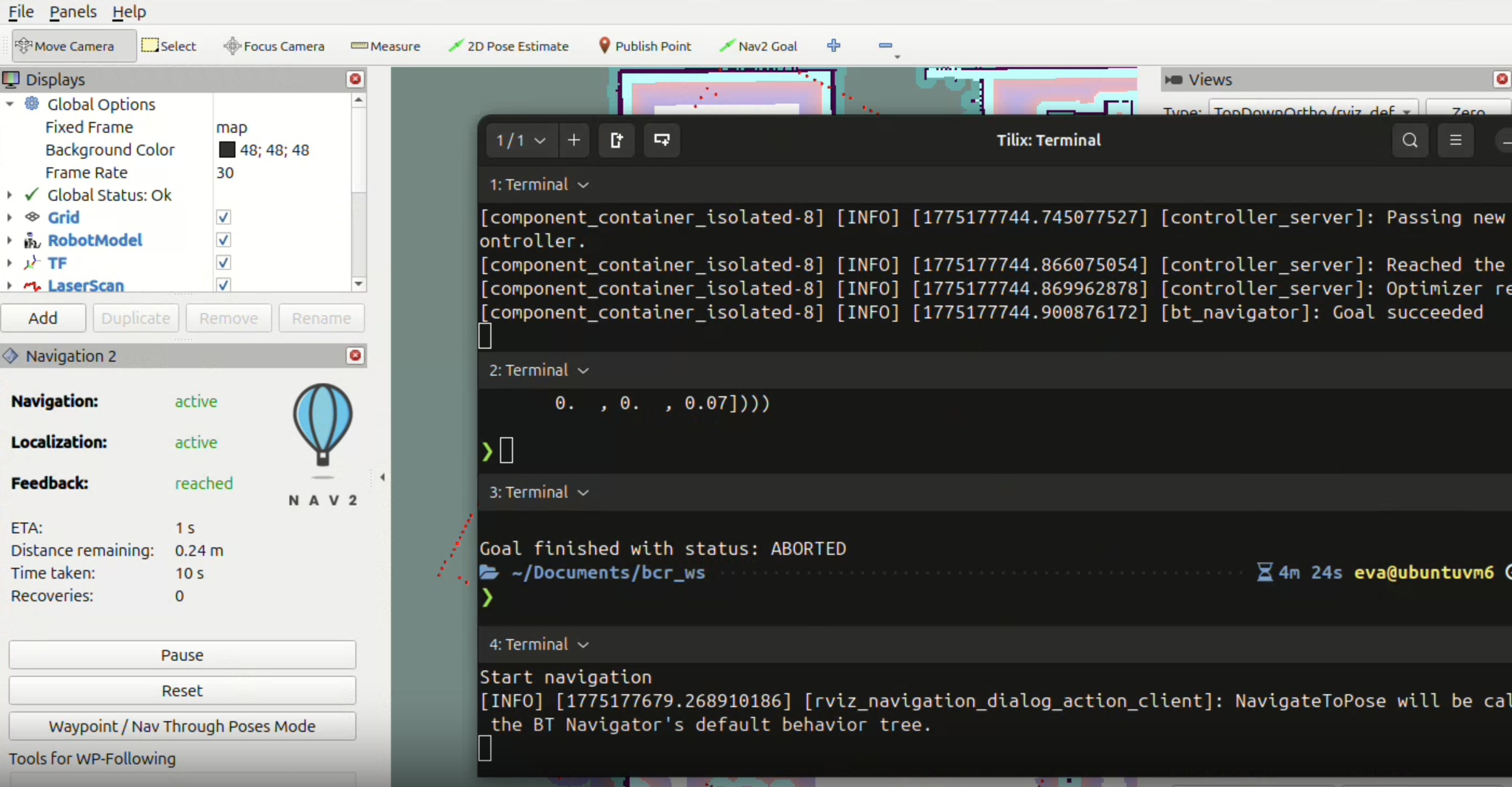
A navigation goal was sent via the Nav2 action server and the robot successfully reached the target:
Goal accepted with ID: 19b190cf401b43cd81f3a2e79e995b96
Feedback: reached
Distance remaining: 0.03 m
Time taken: 24 s
Recoveries: 0
Goal succeeded
Goals were also sent programmatically via navigate_to_goal.py using the NavigateToPose action:
ros2 action send_goal /navigate_to_pose nav2_msgs/action/NavigateToPose \
  "{pose: {header: {frame_id: 'map'}, pose: {position: {x: -10.0, y: -8.0}}}}"
6. Noise Injector: Analysis & Results
How It Works
The noise_injector_node subscribes to /bcr_bot/scan (LiDAR) and /bcr_bot/odom (odometry) and republishes noise-corrupted versions on /scan_noisy and /odom_noisy. Gaussian noise is added independently to each LiDAR range measurement and each odometry position component.
# LiDAR noise injection
ranges = np.array(msg.ranges)
noise = np.random.normal(0, self.lidar_std, ranges.shape)
noisy.ranges = (ranges + noise).tolist()

# Odometry noise injection
noisy.pose.pose.position.x += np.random.normal(0, self.odom_std)
noisy.pose.pose.position.y += np.random.normal(0, self.odom_std)
Noise parameters:
| Parameter | Value | Physical Meaning |
|---|---|---|
lidar_noise_std | 0.02 m | ±20 mm range uncertainty — typical for consumer LiDAR |
odom_noise_std | 0.005 m | ±5 mm position drift per step — typical wheel slip |
These values were chosen to approximate the sensor characteristics of the RPLIDAR A1 and typical differential drive odometry reported in literature.
Before vs. After Comparison
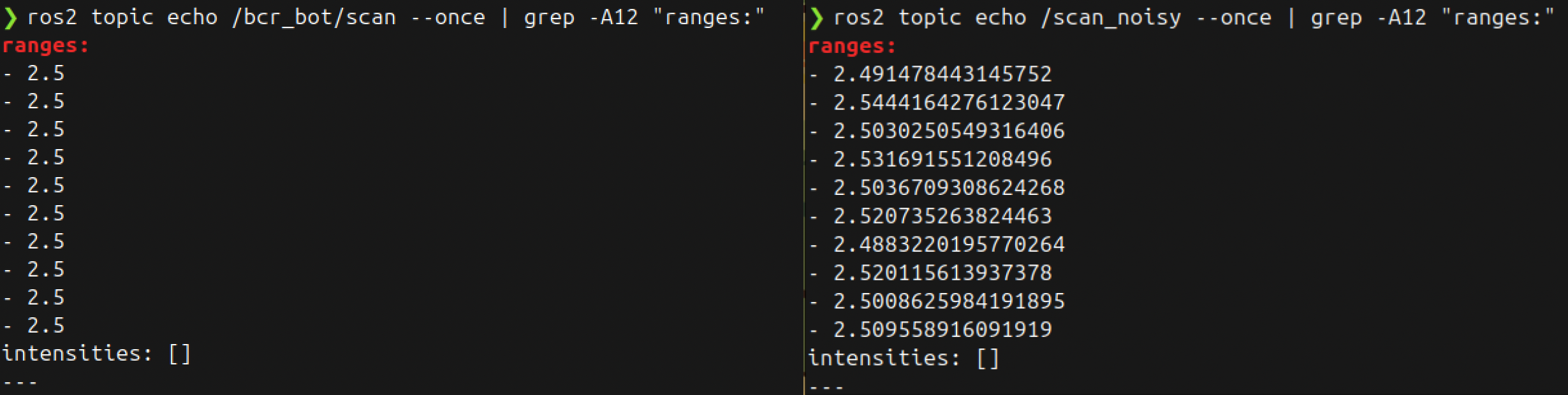
Sample comparison (5 range values, same timestamp):
| Index | Clean /bcr_bot/scan | Noisy /scan_noisy | Difference |
|---|---|---|---|
| 0 | 2.4410 m | 2.4287 m | −0.0123 m |
| 1 | 2.4401 m | 2.4614 m | +0.0213 m |
| 2 | 2.4394 m | 2.4178 m | −0.0216 m |
| 3 | 2.4389 m | 2.4502 m | +0.0113 m |
| 4 | 2.4381 m | 2.4595 m | +0.0214 m |
The noise injector publishes at the same frequency as the input topics (30 Hz for LiDAR, 10 Hz for odometry), confirmed by:
ros2 topic hz /scan_noisy
# average rate: 30.0 Hz
7. Arm Integration
Combined URDF
The bcr_bot_with_arm.urdf.xacro file in the bcr_bot_with_arm package composes the full robot. The arm is attached to the chassis via a fixed arm_mount_joint at position (x=0.10, z=0.18 m) from base_link.
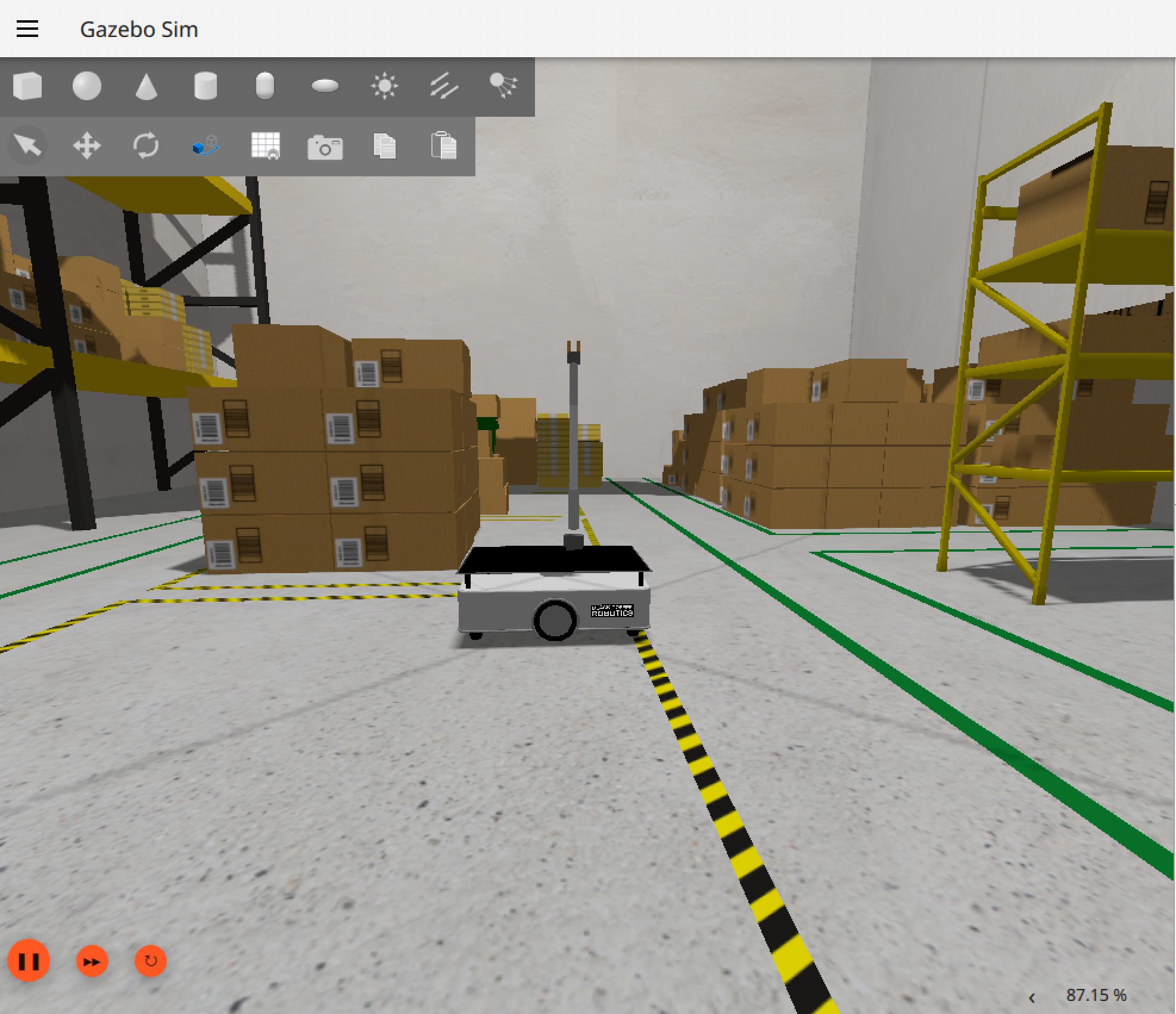
Arm Moving to Pregrasp
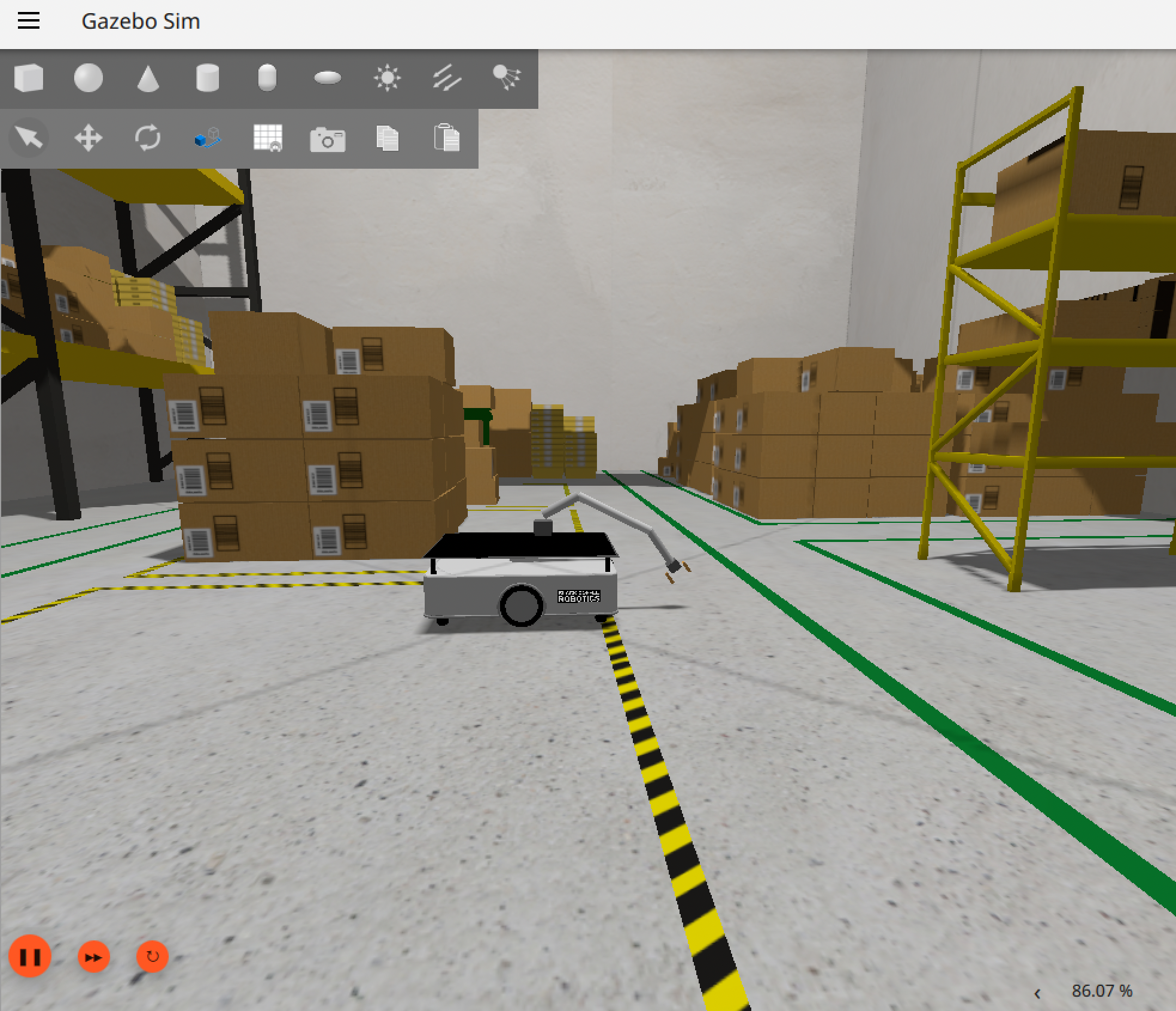
Arm Reaching Ground (Grasp Position)
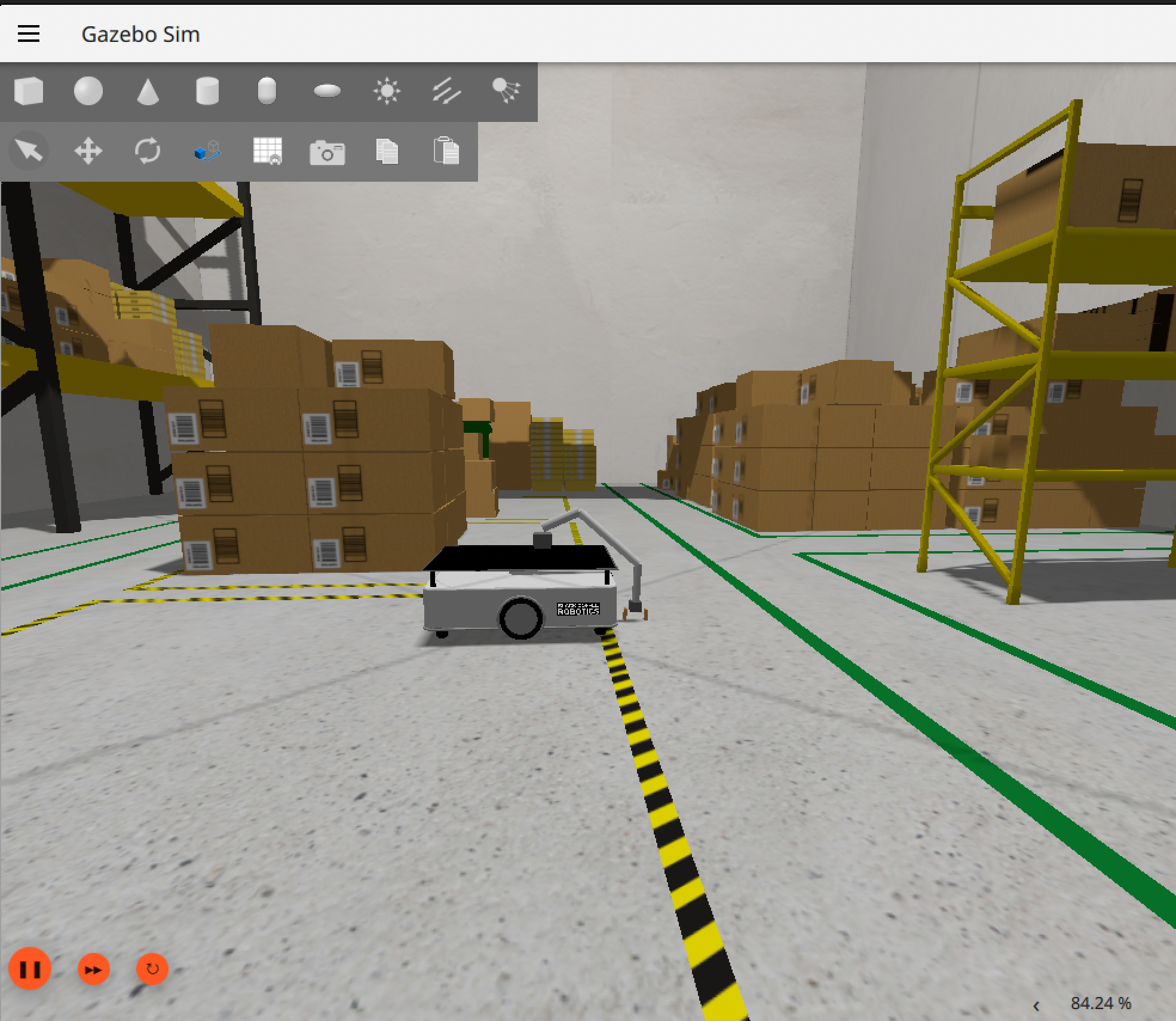
Carry Position
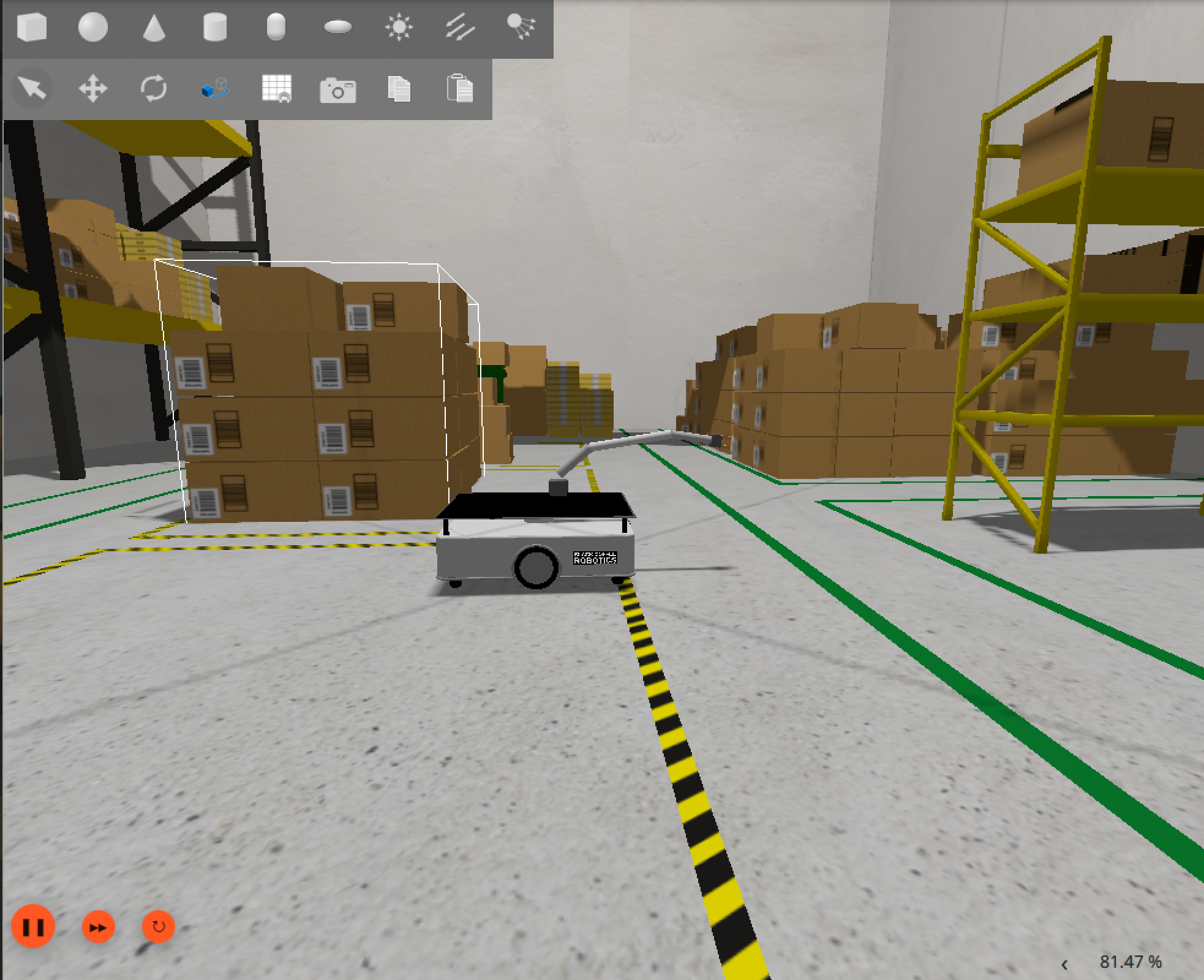
Joint Control
Each arm joint is controlled by a separate gz-sim-joint-position-controller-system plugin, receiving Float64 position commands via ROS-GZ bridge:
# Example: move shoulder joint to -0.8 rad
ros2 topic pub --once /arm_joint2_cmd std_msgs/msg/Float64 "{data: -0.8}"
The bridge translates ROS std_msgs/msg/Float64 → Gazebo gz.msgs.Double for each joint topic.
8. New Nodes
navigate_to_goal.py
A Nav2 action client that sends NavigateToPose goals to the robot. Accepts x, y coordinates, monitors goal progress, and logs success or failure.
| Detail | Value |
|---|---|
| Action client | /navigate_to_pose → nav2_msgs/action/NavigateToPose |
| Dependencies | rclpy, nav2_msgs, geometry_msgs, action_msgs |
| Entry point | navigate_to_goal = semantic_fetch_robot.navigate_to_goal:main |
arm_controller.py
Manages the 3-DOF arm and gripper through a library of hardcoded poses. Resends commands 10 times at 0.4 s intervals to overcome Gazebo physics step latency.
Poses:
| Pose | joint1 | joint2 | joint3 | Gripper |
|---|---|---|---|---|
home | 0.000 | 0.000 | 0.000 | closed |
pregrasp | 1.043 | 0.934 | 0.495 | open |
grasp | 1.156 | 1.163 | 0.913 | open → close |
grasp_close | 1.156 | 1.163 | 0.913 | closed |
carry | 0.827 | 0.527 | 0.299 | closed |
| Detail | Value |
|---|---|
| Publishers | /arm_joint1_cmd, /arm_joint2_cmd, /arm_joint3_cmd, /left_finger_cmd, /right_finger_cmd (Float64) |
| Dependencies | rclpy, std_msgs |
| Entry point | arm_controller = semantic_fetch_robot.arm_controller:main |
fetch_coordinator.py
Sequences the full fetch mission: home arm → navigate to object → grasp → navigate home → deliver. Uses ArmController for arm control and the NavigateToPose action for navigation.
State machine:
IDLE → NAV_TO_OBJECT → GRASP → NAV_HOME → DELIVER → IDLE
| Detail | Value |
|---|---|
| Action client | /navigate_to_pose |
| Uses | ArmController class from arm_controller.py |
| Entry point | fetch_coordinator = semantic_fetch_robot.fetch_coordinator:main |
9. System Node Graph
flowchart LR
%% ===== NAVIGATION CORE =====
  subgraph Nav2_Core["Nav2 Core Servers"]
    bt_navigator["/bt_navigator"]
    controller_server["/controller_server"]
    planner_server["/planner_server"]
    behavior_server["/behavior_server"]
    smoother_server["/smoother_server"]
    route_server["/route_server"]
  end

%% ===== NAVIGATION ACTIONS =====
  subgraph Nav_Actions["Navigation Actions"]
    navigate_to_pose["/navigate_to_pose/_action"]
    navigate_through_poses["/navigate_through_poses/_action"]
    follow_path["/follow_path/_action"]
    compute_path_to_pose["/compute_path_to_pose/_action"]
    compute_path_through_poses["/compute_path_through_poses/_action"]
  end

%% ===== COSTMAPS =====
  subgraph Costmaps["Costmaps"]
    local_costmap["/local_costmap/local_costmap"]
    global_costmap["/global_costmap/global_costmap"]
  end

%% ===== LIFECYCLE & MAP =====
  subgraph Lifecycle["Lifecycle, Map & Localization"]
    lifecycle_nav["/lifecycle_manager_navigation"]
    lifecycle_loc["/lifecycle_manager_localization"]
    map_server["/map_server"]
    amcl["/amcl"]
  end

%% ===== DOCKING =====
  subgraph Docking["Docking & Undocking"]
    docking_server["/docking_server"]
    dock_robot["/dock_robot/_action"]
    undock_robot["/undock_robot/_action"]
    rviz_dock_panel["/nav2_rviz_docking_panel_node"]
  end

%% ===== ROBOT IO =====
  subgraph Robot_IO["Robot, Sensors & Bridge"]
    ros_gz_bridge["/ros_gz_bridge"]
    relay["/relay"]
    bcr_bot["/bcr_bot"]
    collision_monitor["/collision_monitor"]
    velocity_smoother["/velocity_smoother"]
  end

%% ===== TOPICS =====
  subgraph Topics["ROS Topics"]
    topic_cmd_vel["/cmd_vel"]
    topic_cmd_vel_nav["/cmd_vel_nav"]
    topic_cmd_vel_smoothed["/cmd_vel_smoothed"]
    topic_scan["/scan"]
    topic_map["/map"]
    topic_odom["/odom"]
    topic_plan["/plan"]
    topic_bond["/bond"]
    topic_speed_limit["/speed_limit"]
  end

%% --- PUBLISHERS ---
  amcl --> topic_map
  map_server --> topic_map
  controller_server --> topic_cmd_vel_nav
  velocity_smoother --> topic_cmd_vel_smoothed
  collision_monitor --> topic_cmd_vel
  ros_gz_bridge --> bcr_bot
  relay --> topic_scan
  planner_server --> topic_plan
  route_server --> topic_speed_limit

%% --- SUBSCRIBERS ---
  topic_cmd_vel --> ros_gz_bridge
  topic_scan --> local_costmap
  topic_scan --> global_costmap
  topic_map --> global_costmap
  topic_map --> amcl
  topic_odom --> controller_server
  topic_odom --> bt_navigator
  topic_cmd_vel_nav --> velocity_smoother
  topic_cmd_vel_smoothed --> collision_monitor

%% --- ACTION LINKS (simplified) ---
  bt_navigator --> navigate_to_pose
  bt_navigator --> navigate_through_poses
  controller_server --> follow_path
  planner_server --> compute_path_to_pose
  planner_server --> compute_path_through_poses

%% --- COSTMAP RELATIONSHIPS ---
  local_costmap --> controller_server
  global_costmap --> planner_server
  local_costmap --> behavior_server

%% --- DOCKING SYSTEM ---
  docking_server --> dock_robot
  docking_server --> undock_robot
  docking_server --> rviz_dock_panel
  rviz_dock_panel --> docking_server
  docking_server --> topic_cmd_vel

%% --- LIFECYCLE MANAGEMENT ---
  lifecycle_nav --> bt_navigator
  lifecycle_loc --> amcl
  lifecycle_nav --> topic_bond
  lifecycle_loc --> topic_bond
  map_server --> global_costmap
  amcl --> local_costmap
  behavior_server --> topic_bond
  controller_server --> topic_bond
The rqt_graph dot file is saved in the repository. Key connections visible in the graph:
/ros_gz_bridge→/bcr_bot/scan→/relay→/scan→/local_costmap,/global_costmap,/collision_monitor/map_server→/map→/global_costmap,/amcl/amcl→/initialpose→ TFmap→odom/bt_navigator→/navigate_to_poseaction →/planner_server→/controller_server→/cmd_vel→/ros_gz_bridge/noise_injector_node→/scan_noisy,/odom_noisy
10. Run-Time Issues & Solutions
Issue 1: two_d_lidar TF Frame Mismatch
Problem: SLAM Toolbox reported discarding message because the queue is full for frame base_link. The bcr_bot’s LiDAR sensor published with gz_frame_id set to two_d_lidar but the URDF used base_link as the scan reference frame, causing a TF lookup failure.
Solution: Changed <gz_frame_id>two_d_lidar</gz_frame_id> to <gz_frame_id>base_link</gz_frame_id> in gz.xacro. This aligns the Gazebo sensor frame with the URDF TF frame and resolved all queue-full warnings.
Issue 2: AMCL Transform Timeout Blocking Nav2 Activation
Problem: Nav2’s global costmap timed out waiting for base_link → map transform before AMCL had time to initialize. The costmap printed repeated Timed out waiting for transform errors and Nav2 failed to activate.
Solution: Published a static_transform_publisher for map→odom at the known map origin offset (−16.344, −14.035, 0). This gives Nav2 an immediate valid transform on startup. The initial pose is then set via /initialpose topic to activate AMCL’s particle filter. AMCL takes over the transform after receiving its first valid scan.
Issue 3: Map Coordinate Offset
Problem: The robot spawns at Gazebo world coordinates (0, 0) but the saved SLAM map has origin (−16.344, −14.035). This means the robot’s Gazebo position and its map-frame position differ by this offset. Navigation goals in map coordinates must account for this.
Solution: All navigation goals in fetch_coordinator.py use map-frame coordinates (e.g., x=-10.0, y=-8.0) rather than Gazebo world coordinates. The static transform publisher bridges the two coordinate systems.
Issue 4: gz_ros2_control ABI Mismatch on aarch64
Problem: The apt-installed ros-jazzy-gz-ros2-control package failed with undefined symbol: _ZTIN18hardware_interface26HardwareComponentInterfaceE on aarch64 Ubuntu 24.04. This prevented any ros2_control-based arm controller from loading.
Solution: Built gz_ros2_control from source (-b jazzy branch of ros-controls/gz_ros2_control) in the local workspace. The source build compiles against the exact installed hardware_interface version. As an additional measure, the arm control architecture was redesigned to use Gazebo’s native gz-sim-joint-position-controller-system plugin instead of ros2_control entirely, eliminating the dependency.
Issue 5: Arm Joint Not Responding to Single Commands
Problem: Publishing a single /arm_joint*_cmd message often had no effect. The Gazebo physics step did not always process a single latched message reliably.
Solution: The arm_controller.py move_to_pose() method resends each command 10 times at 0.4 s intervals before waiting for the settle time. This ensures the command is received and processed regardless of Gazebo physics step timing.
11. Milestone Video
Video link: Milestone 2 Video
The milestone video demonstrates:
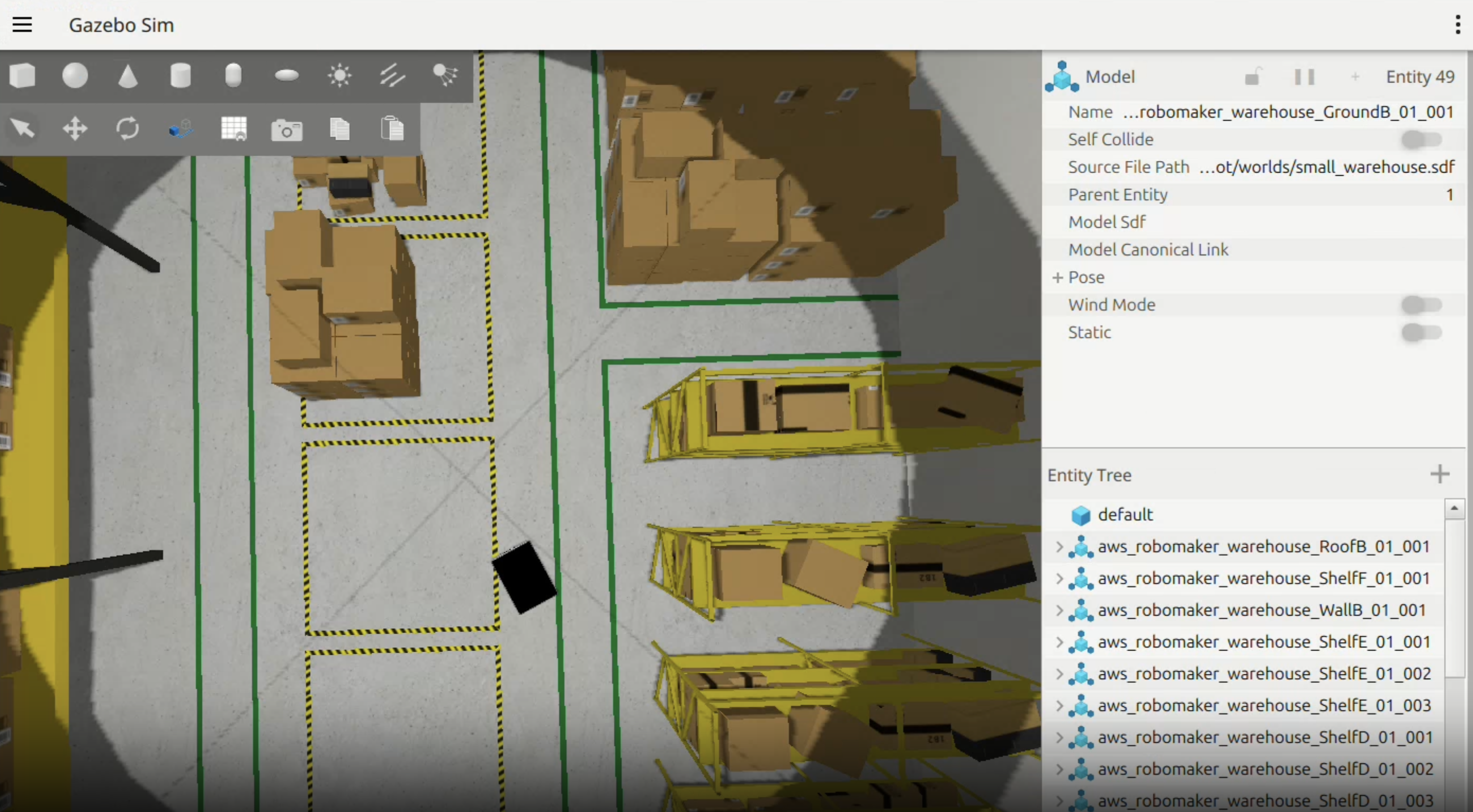
- Gazebo Harmonic simulation launching with bcr_bot + arm in the small warehouse world
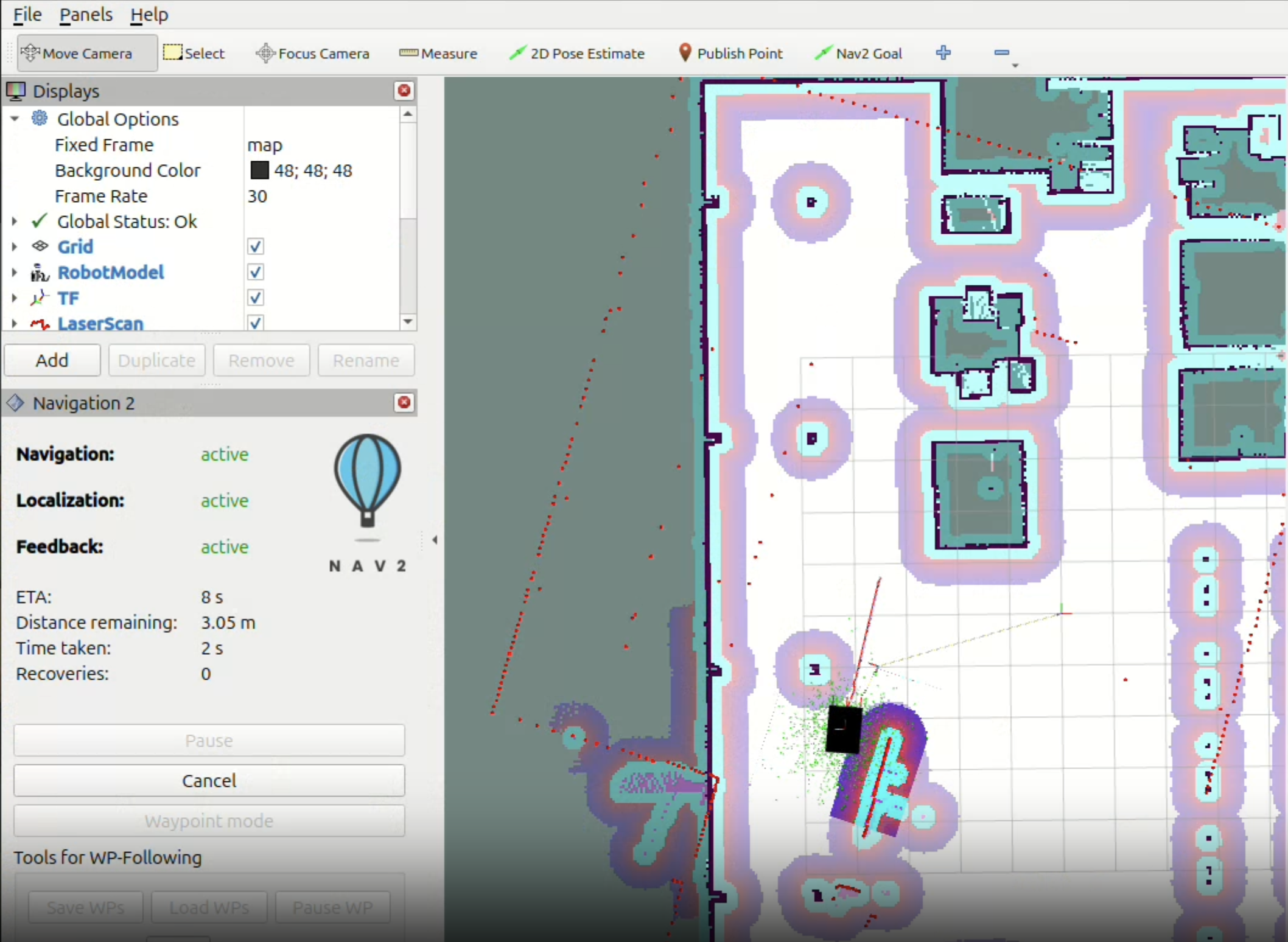
- RViz showing the pre-built occupancy map, LiDAR scan overlay, and Nav2 costmap
- Navigation goal sent — robot plans a path and drives autonomously to the goal
- Nav2 panel showing “Navigation: active”, distance remaining decreasing, “Feedback: reached”
- Noise injector running —
/scan_noisytopic visible in a terminal - Arm moving through home → pregrasp → grasp → carry sequence
12. Individual Contributions
| Team Member | Role | Key Contributions | Files / Commits |
|---|---|---|---|
| Suyash Dhir | Simulation, Navigation & Manipulation Lead | Simulation environment setup (bcr_bot + Gazebo Harmonic) · SLAM mapping session and parameter tuning · Nav2 bringup, debugging, and custom params · TF frame issue diagnosis and static transform workaround · Combined robot URDF (bcr_bot_with_arm) design and composition · Arm joint axis redesign (Z→Y) for ground reach · Arm pose calibration (all 4 poses measured from Gazebo joint states) · arm_controller.py implementation · fetch_coordinator.py mission sequencer · navigate_to_goal.py Nav2 action client · noise_injector_node.py testing and data collection · Launch file development (bcr_bot_with_arm.launch.py) · rqt_graph capture · Milestone video recording · All screenshots | semantic_fetch_robot/arm_controller.py · semantic_fetch_robot/fetch_coordinator.py · semantic_fetch_robot/navigate_to_goal.py · bcr_bot_with_arm/urdf/ · bcr_bot_with_arm/launch/ · maps/ · Commit: a8a612a05a160cee850b0d3aae57615736a40b80 |
| Divyaraj Nakum | Documentation & Architecture Lead | milestone2.md full report authoring · milestone1.md revision and corrections · Kinematics derivation (differential drive + 3-DOF arm forward kinematics) · System architecture update table · M1 feedback integration table · Run-time issues documentation · Noise injector experimental analysis write-up · MathJax rendering setup (_includes/head_custom.html) | milestone2.md · milestone1.md · _includes/head_custom.html · _config.yml · Commit: 26c146d0a799ca10f55f887b59d651752c316259 |
Running Milestone 2
Prerequisites
# Build bcr_bot_with_arm package
cd ~/Documents/bcr_ws
colcon build --packages-select bcr_bot_with_arm gz_ros2_control \
  --allow-overriding gz_ros2_control --symlink-install
source install/setup.bash

# Build semantic_fetch_robot package
cd ~/Documents/semantic_fetch_robot
colcon build --symlink-install
source install/setup.bash
Launch Simulation with Arm
ros2 launch bcr_bot_with_arm bcr_bot_with_arm.launch.py
Press ▶ Play in Gazebo. Wait 10 seconds.
Launch Nav2
ros2 launch nav2_bringup bringup_launch.py \
  use_sim_time:=true \
  map:=/home/eva/Documents/bcr_ws/maps/warehouse_map.yaml \
  params_file:=/home/eva/Documents/bcr_ws/nav2_params.yaml
Set Initial Pose
ros2 topic pub --once /initialpose \
  geometry_msgs/msg/PoseWithCovarianceStamped \
  '{header: {frame_id: "map"}, pose: {pose: {position: {x: -16.0, y: -13.5, z: 0.0}, orientation: {w: 1.0}}, covariance: [0.25,0,0,0,0,0,0,0.25,0,0,0,0,0,0,0,0,0,0,0,0,0,0,0,0,0,0,0,0,0,0,0,0,0,0,0,0.07]}}'
Run Noise Injector
ros2 run semantic_fetch_robot noise_injector_node
Test Navigation
ros2 run semantic_fetch_robot navigate_to_goal
Test Arm Sequence
ros2 run semantic_fetch_robot arm_controller
Run Full Fetch Mission
ros2 run semantic_fetch_robot fetch_coordinator
Next → Milestone 3 — Object spawning + full pick-and-place pipeline
Semantic Fetch Robot · RAS 598 Mobile Robotics · Team: Point Cloud Nine · Arizona State University · 2026